Tutorial
LeadRM User Guide
Cold email list cleaning + light CRM — from universal CSV import to Instantly / Smartlead export.
Quick answers
What LeadRM is, what it is for, benefits, and cost — Free product with optional BYOK MillionVerifier and Gemini credits.
What is it?
- LeadRM is a cold-lead data preparation and light CRM app (not an email sender).
- Import any B2B CSV (Apollo, ZoomInfo, Outscraper) via Universal CSV Mapper, verify emails with MillionVerifier BYOK, tag campaigns, manage lifecycle phases and interactions.
- Export clean CSVs for Instantly or Smartlead — LeadRM never sends email. Draft with AI (Gemini BYOK) is copy-only.
What is it for?
- Prep and clean B2B cold email lists before Instantly or Smartlead outreach.
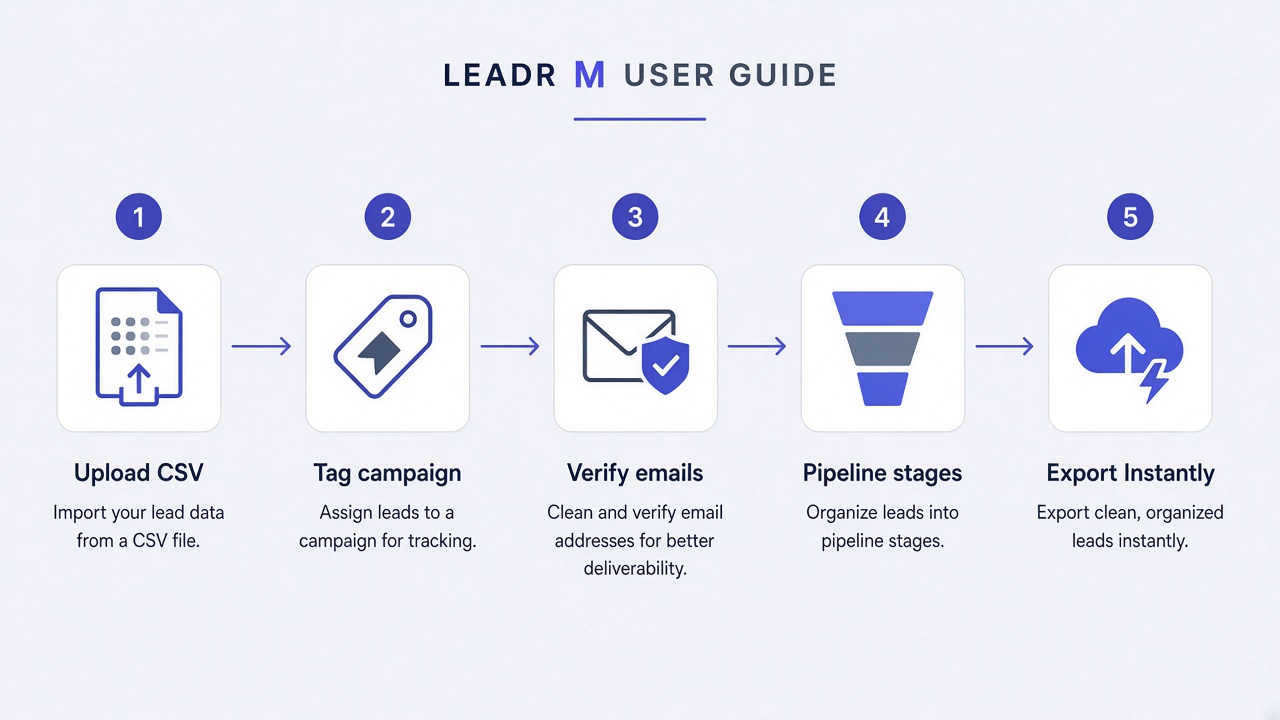
- Universal CSV → MillionVerifier verify (Cold phase) → catch-all/invalid filter → campaign-tagged export; track Opportunities and Customers with notes/calls.
- Not for sending cold email, SMTP, or replacing Instantly / Smartlead / MillionVerifier.
What are the benefits?
- Cleaner Instantly / Smartlead imports via ok / invalid / catch-all filtering.
- Lifecycle phases, slide-over detail drawer + interaction timeline, campaign merge, and global unsubscribe exclusion.
- Universal CSV Mapper (not Outscraper-only); Logo.dev company logos; stale-contact warnings on Customers (>30 days).
- BYOK MillionVerifier + optional Gemini Draft with AI (copy only); Developer Test Mode; Free LeadRM product cost.
How much does it cost?
- Free — LeadRM itself is free to use.
- If you run live verification, you pay MillionVerifier directly for BYOK credits (LeadRM does not bill or resell those credits).
- Optional Draft with AI uses your own Google AI Studio (Gemini) key — LeadRM does not bill for Gemini usage.
- Apollo, ZoomInfo, Outscraper, Instantly, and Smartlead are separate products you pay those vendors for if you use them.
1. Sign up / sign in
- Go to /app and create an account or sign in.
- Email/password and Google sign-in are supported.
- Your leads stay scoped to your LeadRM account in LeadRM Cloud.
2. API Keys (MillionVerifier + optional Gemini)
- Click API Keys (or Settings) in the header.
- Paste your MillionVerifier API key; store in localStorage or LeadRM Cloud.
- Optional: paste a Google AI Studio (Gemini) key — always saved to LeadRM Cloud for Draft with AI.
- Optional: enable Developer Test Mode to simulate verification without spending MillionVerifier credits.
3. Campaign + Universal CSV Mapper
- Enter a campaign / list name before or with import.
- Upload Apollo, ZoomInfo, Outscraper, or any B2B CSV — map columns in the Universal CSV Mapper (auto-match common headers).
- Hard safety cap: 5,000 rows per upload.
- Unmapped columns are preserved on the lead record.
4. Campaign tagging + email master-record merge
- LeadRM deduplicates by email when possible.
- Re-importing the same email merges campaign tags onto the master record.
- Intra-file duplicate emails are skipped after the first occurrence.
5. Lifecycle phases: Cold Leads / Opportunities / Customers
- Cold Leads — stages Raw → Verified → Outreach (Verify Unchecked + Export for Automation available here).
- Opportunities — Follow-up and Negotiation.
- Customers — Customer stage with CRM-oriented columns and stale-contact alerts.
- Switch phases from the dashboard tab switcher; move leads between stages as deals progress.
6. Slide-over detail drawer + interaction timeline
- Open any lead row to open the slide-over detail drawer.
- Log interactions: Note, Call, Support, or Meeting — each appears on the timeline.
- Company logos load via Logo.dev from website or email domain, or company name (with a fallback icon).
- Use Draft with AI for a copy-paste email draft (requires Gemini BYOK key; does not send).
7. Verify Unchecked Emails + Test Mode (Cold only)
- On Cold Leads, click Verify Unchecked Emails to process unverified addresses.
- Live mode calls MillionVerifier with your BYOK key and credits.
- Test Mode returns simulated results for UI practice.
- Results include ok, invalid, catch_all (domain accepts any address — riskier for outreach), disposable, unknown, and error-style outcomes.
8. Global unsubscribe
- Mark a lead as globally unsubscribed to block automation export.
- Unsubscribed leads are excluded even if they are Verified and in-campaign.
- Use this for suppressions that should apply across campaigns.
9. Export for Automation (Cold + Verified rules)
- Available from Cold Leads when a specific campaign is selected (not All campaigns).
- Rules: funnel stage Verified + in campaign + not unsubscribed + has email.
- Download stays on your device for Instantly or Smartlead import.
- LeadRM does not upload to Instantly or Smartlead.
10. Stale contact warnings (Customers)
- On Customers, contacts with no last interaction or last contact older than 30 days show a stale / needs follow-up warning.
- Logging a Note, Call, Support, or Meeting updates last contacted and clears staleness.
11. Sample leads for new accounts
- New accounts may receive sample leads to explore filters, phases, and export.
- Sample leads are editable and deletable like any other lead.
- Replace them with your CSV import when ready.
Guide FAQ
What is it?+−
- LeadRM is a cold-lead data preparation and light CRM app (not an email sender).
- Import any B2B CSV (Apollo, ZoomInfo, Outscraper) via Universal CSV Mapper, verify emails with MillionVerifier BYOK, tag campaigns, manage lifecycle phases and interactions.
- Export clean CSVs for Instantly or Smartlead — LeadRM never sends email. Draft with AI (Gemini BYOK) is copy-only.
What is it for?+−
- Prep and clean B2B cold email lists before Instantly or Smartlead outreach.
- Universal CSV → MillionVerifier verify (Cold phase) → catch-all/invalid filter → campaign-tagged export; track Opportunities and Customers with notes/calls.
- Not for sending cold email, SMTP, or replacing Instantly / Smartlead / MillionVerifier.
What are the benefits?+−
- Cleaner Instantly / Smartlead imports via ok / invalid / catch-all filtering.
- Lifecycle phases, slide-over detail drawer + interaction timeline, campaign merge, and global unsubscribe exclusion.
- Universal CSV Mapper (not Outscraper-only); Logo.dev company logos; stale-contact warnings on Customers (>30 days).
- BYOK MillionVerifier + optional Gemini Draft with AI (copy only); Developer Test Mode; Free LeadRM product cost.
How much does it cost?+−
- Free — LeadRM itself is free to use.
- If you run live verification, you pay MillionVerifier directly for BYOK credits (LeadRM does not bill or resell those credits).
- Optional Draft with AI uses your own Google AI Studio (Gemini) key — LeadRM does not bill for Gemini usage.
- Apollo, ZoomInfo, Outscraper, Instantly, and Smartlead are separate products you pay those vendors for if you use them.
How do I connect MillionVerifier to LeadRM?+−
In the app, open API Keys, paste your MillionVerifier API key, and save. Choose local browser storage or LeadRM Cloud. LeadRM never bills you for MillionVerifier credits.
What CSV sources does LeadRM support?+−
Any B2B lead CSV. The Universal CSV Mapper works with Apollo, ZoomInfo, Outscraper, and custom exports — you map columns instead of requiring an Outscraper-only format. Cap is 5,000 rows per upload.
What are Cold Leads, Opportunities, and Customers?+−
Lifecycle phases in LeadRM. Cold Leads = Raw / Verified / Outreach (verify + export live here). Opportunities = Follow-up / Negotiation. Customers = Customer stage, with CRM columns and stale-contact warnings when last contact is missing or older than 30 days.
What does Export for Automation include?+−
From Cold Leads only: selected campaign (not All), funnel stage Verified, not globally unsubscribed, and has an email. The file downloads to your device.
Does Draft with AI send email?+−
No. Draft with AI uses your Google AI Studio (Gemini) key stored in LeadRM Cloud to generate a copy-paste draft in the contact drawer. LeadRM never sends email.
Does LeadRM send the cold emails?+−
No. After export, import the CSV into Instantly or Smartlead (or another sender) to run outreach.